🔐 Passkeys by Default: Microsoft Is Retiring SMS & Voice MFA — What Every IT Admin Needs to Know
If your organization still leans on SMS text messages or automated voice calls for multi-factor authentication in Microsoft Entra ID 🪟, the clock just started ticking. Microsoft has announced a major identity security shift: passkeys become the default sign-in experience, and Microsoft-provided SMS/voice MFA delivery is being retired entirely. This isn’t a minor policy tweak — it’s a fundamental change to how every Entra tenant handles multi-factor authentication. 🚨
📌 Why This Matters
SMS and voice codes have long been known as the weakest link in MFA. They’re vulnerable to SIM-swap fraud, phishing, and real-time relay attacks. As AI-driven phishing and social engineering scale up, Microsoft is pushing every tenant toward phishing-resistant authentication — primarily passkeys, FIDO2 security keys, and Windows Hello for Business — as the new baseline for identity security. 🛡️
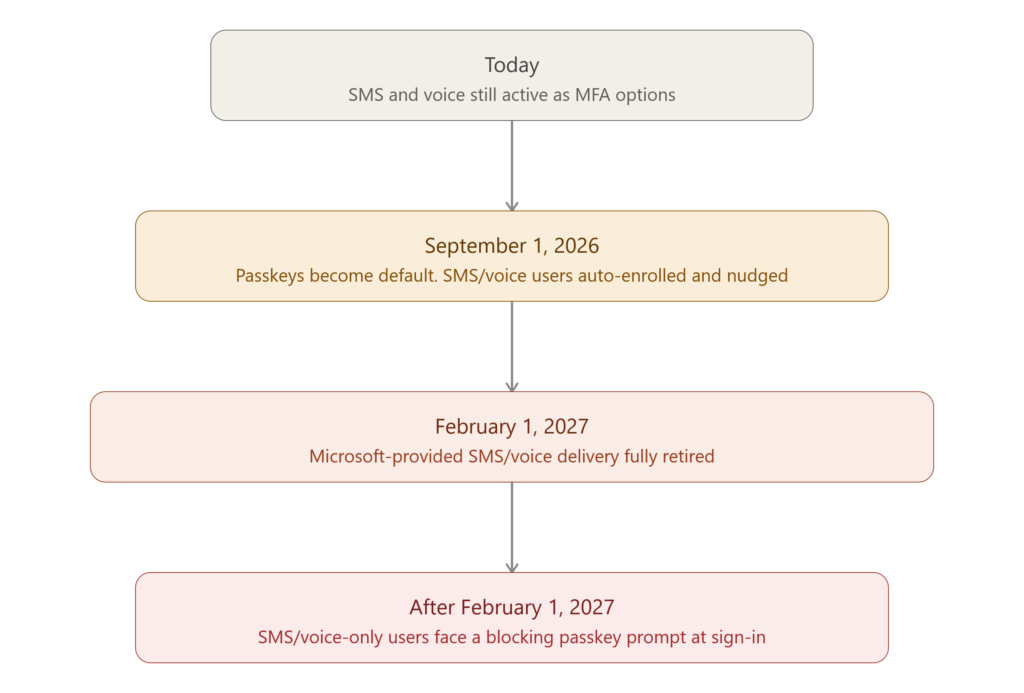
🗓️ The Retirement Timeline You Can’t Ignore
| Date | What Happens | Action Required |
|---|---|---|
| 🟡 September 1, 2026 | Passkeys become the default sign-in method. Any user currently enabled for SMS or voice is automatically enrolled into a passkey profile and nudged to register on eligible devices. | Notify users now. Start your passkey rollout using Microsoft’s deployment guide. |
| 🟠 February 1, 2027 | Microsoft-provided SMS and voice delivery is fully retired. Organizations that still need telecom-based MFA must configure a customer-managed provider through the Microsoft Security Store (available for evaluation from September 18, 2026, and selectable from October 30, 2026). | Every user must be on a phishing-resistant method, or configure a third-party telecom provider before this date. |
| 🔴 After February 1, 2027 | Users whose only registered MFA method is SMS or voice hit a blocking sign-in prompt — they must register a passkey before they can access their account. There is no opt-out. This is enforced across every tenant. | Migrate all remaining SMS/voice-only users before this date to avoid lockouts. |
⚠️ Key point: organizations can temporarily delay the automatic passkey enrollment (via the passkeyDynamicMigration opt-out flag in the Authentication Methods Policy through Microsoft Graph), but this opt-out does not apply to the February 1, 2027 enforcement. That deadline is hard for everyone. 🔒
🧭 How to Prepare — A 5-Step Playbook
1️⃣ Find out who’s still using SMS or Voice
Before you plan anything, you need visibility into which users are actually enrolled in SMS or voice MFA. Microsoft published an open-source PowerShell tool for exactly this purpose:
👉 entra-sms-voice-usage-analyzer
This script connects to Microsoft Graph and reports on:
- 📊 Registration campaign state (disabled / enabled / Microsoft-managed)
- 📋 SMS and voice policy scope — included and excluded users/groups
- 📁 A CSV export of every in-scope user, ready for tracking
- 🧮 An impact summary mapped against the retirement milestones above
It needs only read-level Graph permissions (Policy.Read.All, Group.Read.All) and a Global Reader, Authentication Policy Administrator, or Security Reader role — so any identity admin can run it safely without making changes.
2️⃣ Move users to passkeys 🔑
Entra ID supports two passkey types:
- Synced passkeys — stored in a platform credential manager (iCloud Keychain, Google Password Manager) and synced across a user’s devices. Best for most everyday users.
- Device-bound passkeys — created and stored on a single device (Passkey in Microsoft Authenticator, Entra Passkey on Windows, FIDO2 hardware keys). Best for admins and highly regulated roles.
3️⃣ Build a phased deployment plan 📈
Microsoft’s official guidance recommends segmenting your organization into personas — admins/highly-regulated users vs. everyone else — and rolling out portable credentials (passkeys, FIDO2 keys) first, followed by local device credentials like Windows Hello for Business. Pilot with a test group, measure adoption through the Authentication Methods Activity report, then expand persona by persona and platform by platform (Windows → macOS → iOS → Android).
4️⃣ Evaluate a telecom provider only if truly necessary ☎️
If your organization operates under a regulatory or compliance requirement that mandates an SMS/voice channel, you’ll be able to select a customer-managed telecom provider through the Microsoft Security Store starting late October 2026. For everyone else, Microsoft’s clear recommendation is: default to passkeys.
5️⃣ Communicate early, communicate often 📣
Microsoft recommends a three-stage communication cadence — Awareness → Action → Reminder — using their free end-user templates (email, Teams, help-desk scripts) available at aka.ms/mfatemplates. Don’t wait until October 2026 to tell your users what’s coming.
💡 Bottom Line
This isn’t a “nice to have” security upgrade — it’s a forced migration with a hard enforcement date and zero opt-out after February 1, 2027. Tenants that start now, using Microsoft’s free analyzer script to baseline their SMS/voice footprint, will avoid help-desk chaos and locked-out users next year. Tenants that wait will be scrambling in Q4 2026. ⏳
Passkeys aren’t just more secure — they’re also faster and more convenient for end users once registered. This is one of those rare security upgrades that improves the experience and reduces risk. 🙌
🔗 Official Microsoft Resources
- Passkeys by default and retirement of Microsoft-provided SMS and voice authentication
- Plan a phishing-resistant passwordless authentication deployment
- Microsoft Entra authentication methods overview
- entra-sms-voice-usage-analyzer on GitHub
💬 Have you started your passkey rollout yet? Drop a comment or connect with me — happy to share lessons learned from real-world Entra ID migrations.
